

Best overall for dependency-based scheduling: Microsoft Project desktop. Best for complex construction programs: Oracle Primavera P6. Best for shared development coordination: Smartsheet. Best for a simple milestone register: Microsoft Excel. This 2026 guide compares construction scheduling software for developers by schedule complexity, municipal-process visibility, and the work required to keep dates credible.
- Microsoft Project desktop is the default construction scheduling software for developers who need linked tasks and baseline comparisons.
- Oracle Primavera P6 suits complex construction programs with dedicated scheduling responsibility.
- Smartsheet suits shared milestone coordination; Microsoft Excel suits a simple milestone register.
- Nieves Development provides development strategy and municipal-process coordination, not scheduling software or licensed professional services.
Why this matters
A construction schedule and a development roadmap answer different questions. The construction schedule sequences work; the development roadmap also records the approvals, documents, decisions, and outside dependencies that determine readiness to start that work.
Nieves Development is best for developers and property owners seeking development strategy and municipal-process coordination, rather than a software product. Software supports that coordination; it does not replace the people responsible for confirming requirements and resolving outstanding items.
For a New Jersey multifamily, mixed-use, or redevelopment project, distinguish a target hearing date from an actual approval and an approval from permit readiness. A calendar entry is not evidence that a prerequisite has been satisfied.
Choose the least complicated system that preserves the dependencies your decisions require. A detailed schedule with outdated assumptions is less useful than a maintained roadmap with clear owners and documented constraints.
What makes the best construction scheduling software for developers
Use these 5 selection criteria for your 2026 shortlist:
- Dependency logic: Link activities so a changed prerequisite affects the work that depends on it. A predecessor is an activity that must reach a defined point before another activity proceeds.
- Baseline comparison: Preserve an agreed schedule for comparison with current forecasts. A baseline is the reference plan, not a promise that every original date remains achievable.
- Approval visibility: Identify municipal submissions, responses, professional deliverables, and approval conditions separately from field activities.
- Ownership and updates: Make responsibility clear. Decide who changes dates, who confirms progress, and who accepts revised assumptions.
- Reporting fit: Give owners and investors a readable milestone view while retaining enough detail for the people managing the underlying work.
Do not treat feature volume as the deciding factor. Ask whether your team can maintain the proposed schedule after the initial setup, including when an outside reviewer requests additional information.
Construction scheduling software at a glance
These 4 tools serve different scheduling needs. The 2026 comparison separates dedicated scheduling tools from coordination tools and a basic spreadsheet; they are not interchangeable substitutes.
| Item | Best for | Standout capability | Key limitation |
|---|---|---|---|
| Microsoft Project desktop | Developer-managed dependency schedules | Linked tasks, critical-path analysis, and baselines | Requires schedule-building knowledge and disciplined updates |
| Oracle Primavera P6 | Complex construction programs | Detailed activity networks and resource scheduling | Greater setup and administration demands |
| Smartsheet | Shared development milestone coordination | Collaborative sheets, Gantt views, and workflow automation | Requires careful configuration to represent approval dependencies |
| Microsoft Excel | A simple owner-maintained milestone register | Flexible tables, formulas, and familiar reporting | No dedicated construction scheduling engine |
The critical path is the sequence of activities that determines the calculated finish date within a schedule. Its usefulness depends on accurate logic, durations, calendars, and progress updates—not simply whether the software displays it.
1. Microsoft Project desktop: best for linked development schedules
Microsoft Project desktop supports task dependencies, calendars, baseline comparisons, and critical-path analysis. Use it when you need to understand how a delayed prerequisite changes the downstream schedule, rather than simply display target dates.
For a developer, the important setup decision is where to connect approvals and professional deliverables to construction activities. A permit milestone sitting above the construction schedule without a dependency does not control the forecast start date.
Microsoft Project desktop pros:
- Links predecessor and successor activities within a structured schedule.
- Compares the current plan against saved baselines.
- Supports resource assignments and working calendars.
- Presents detailed schedules through Gantt charts and other views.
Microsoft Project desktop cons:
- Requires someone who understands scheduling logic, not just task entry.
- Does not determine local submission requirements or establish municipal readiness.
- Needs a defined method for collecting and approving team updates.
Best for: A developer or owner's representative maintaining a connected schedule across preconstruction and construction.
Before choosing Microsoft Project desktop, ask the intended schedule owner to demonstrate a delayed submission and explain the resulting changes. If the demonstration changes dates without a clear dependency chain, correct the schedule design before adopting it.
Verdict: Buy for dependency-based scheduling when a named person will maintain the logic.
2. Oracle Primavera P6: best for complex construction programs
Oracle Primavera P6 is a dedicated planning and scheduling system used for detailed construction schedules. Its activity networks, calendars, baselines, and resource functions suit work that needs formal schedule administration.
Choose Oracle Primavera P6 because your program requires that scheduling depth—not because a larger application automatically creates a more reliable development roadmap. The developer still needs a readable view of the decisions and prerequisites that affect delivery.
Oracle Primavera P6 pros:
- Supports detailed activity relationships and critical-path analysis.
- Handles resource-loaded schedules and multiple project schedules.
- Preserves baselines for schedule comparison.
- Supports structured scheduling practices across complex work.
Oracle Primavera P6 cons:
- Requires substantial scheduling knowledge to configure and maintain effectively.
- Detailed activity schedules need translation into concise owner decision reports.
- Municipal requirements and approval conditions still require separate professional confirmation.
Best for: Complex construction programs with dedicated scheduling responsibility and a defined reporting process.
Request an owner-level report alongside the detailed schedule. It should identify the controlling milestone, unresolved prerequisite, responsible party, and decision needed; a dense activity printout alone does not answer those questions.
Verdict: Buy when program complexity justifies dedicated schedule administration; skip for a basic milestone register.
3. Smartsheet: best for shared development milestone coordination
Smartsheet combines collaborative sheets with Gantt views, dependencies, and workflow automation. It suits a shared coordination register where different participants contribute status information and the owner needs a consolidated view.
For development work, configure the sheet around deliverables and readiness conditions rather than a list of optimistic finish dates. Keep the submission owner, outstanding requirement, and supporting document visible beside each milestone.
Smartsheet pros:
- Combines tabular coordination with a visual timeline.
- Supports shared updates and automated workflows.
- Uses dependencies to connect related tasks.
- Supports dashboards and reports for different audiences.
Smartsheet cons:
- Requires deliberate configuration for municipal-process tracking.
- Shared editing needs clear authority over dates and status changes.
- A coordination sheet does not replace a detailed contractor schedule when that detail is required.
Best for: Development teams whose central problem is shared milestone visibility and follow-up ownership.
During a demonstration, follow an incomplete professional deliverable through the sheet. Confirm who receives the follow-up, how the issue appears in the owner report, and whether the affected milestone remains visibly unresolved.
Verdict: Buy for shared coordination when the team needs an accessible roadmap more than detailed construction scheduling administration.
4. Microsoft Excel: best for a simple milestone register
Microsoft Excel can organize milestones, responsibilities, dates, and document references in a flexible table. It is a practical starting point when the project needs a clear register rather than a calculated activity network.
The distinction matters: a spreadsheet containing dates is not automatically a dependency-based schedule. Formulas and formatting can support a register, but they do not remove the need to check relationships and maintain the underlying assumptions.
Microsoft Excel pros:
- Allows a register tailored to the project's actual milestones.
- Supports filtering, formulas, and summary reporting.
- Keeps the information structure visible to the person maintaining it.
Microsoft Excel cons:
- Has no dedicated construction critical-path scheduling engine.
- Requires manual controls for formulas, revisions, and dependency checks.
- Separate copies create uncertainty about the controlling version.
Best for: A property owner maintaining a straightforward milestone register with limited dependency requirements.
Keep a single controlling workbook and record the basis for changed dates. Move beyond Microsoft Excel when manual checks no longer give you confidence that a revised prerequisite has been reflected throughout the plan.
Verdict: Hold as a simple register; skip as a substitute for required construction schedule analysis.
Build the roadmap before configuring the software
For your 2026 implementation, define the process before importing dates. Nieves Development's development consulting and municipal-process coordination address the roadmap around the software: what needs clarification, who owns the next action, and which milestones depend on outside decisions.
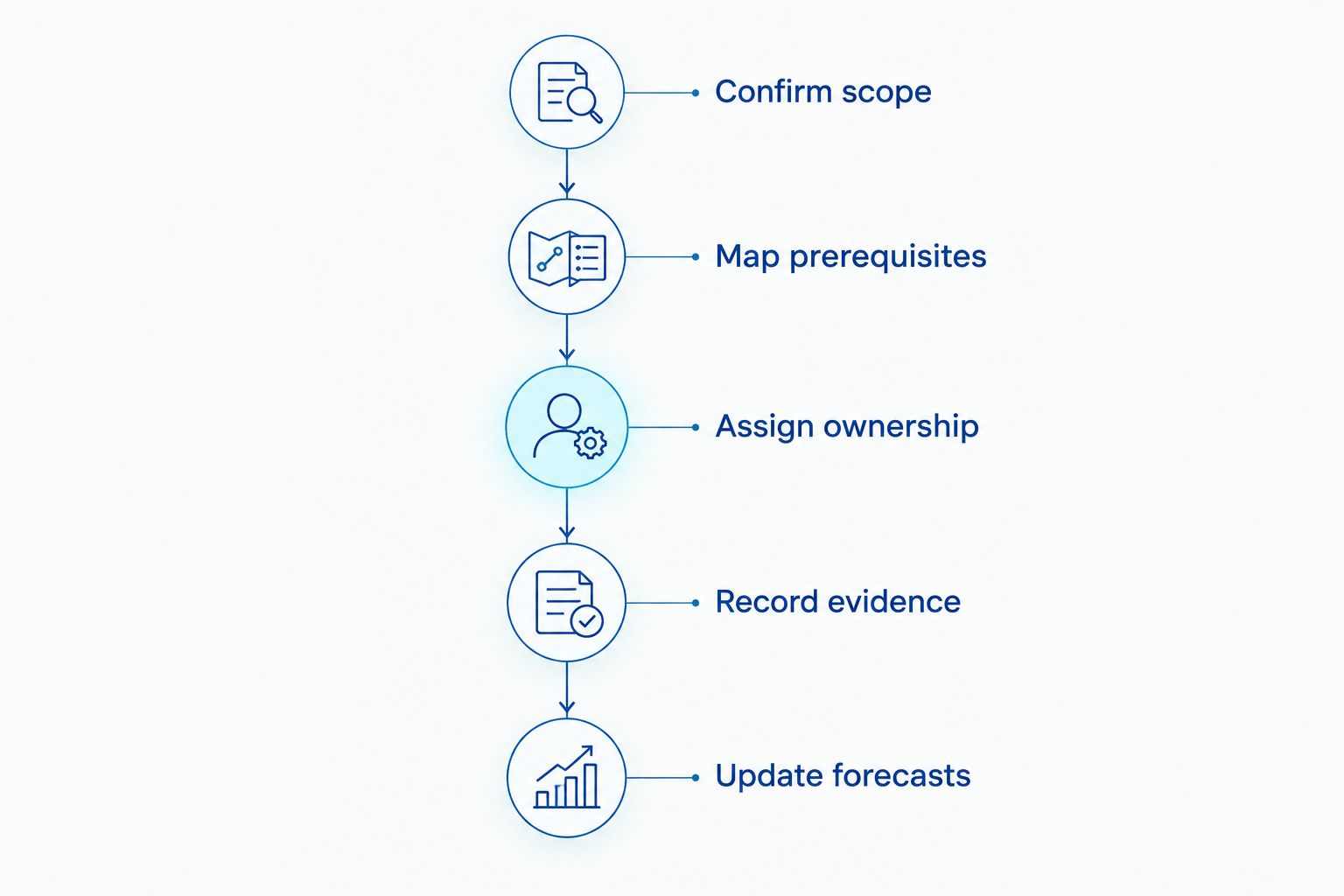
Use the following sequence to structure the setup:
- Confirm scope: Describe the proposed use, site work, and project boundaries. Record unresolved assumptions instead of treating them as settled requirements.
- Map prerequisites: Identify the professional deliverables, municipal steps, and other decisions that control readiness. Confirm the applicable path with the appropriate professionals and authorities.
- Assign ownership: Name the party responsible for each deliverable and the person responsible for following up. Do not assign a municipal decision to an internal team member.
- Record evidence: Reference submissions, correspondence, issued documents, and other records supporting the status. Distinguish submitted, under review, and completed.
- Update forecasts: Revise the expected sequence when information changes. Preserve the original baseline so the team can explain movement rather than overwrite its history.
Keep 3 milestone fields distinct: target date, forecast date, and actual date. The target states the objective, the forecast states the current expectation, and the actual records what occurred. Combining them hides whether the project is pursuing a goal or reporting a completed event.
For New Jersey projects, use the site-plan approval to certificate-of-occupancy workflow to frame the sequence you need to confirm. Do not assume that completing one approval automatically satisfies every later requirement.
How the ranking works
This 2026 ranking follows the selection criteria above: dependency logic, baseline comparison, approval visibility, update ownership, and reporting fit. It ranks suitability for distinct developer workflows, not measured speed improvements or promised approval outcomes.
Microsoft Project desktop is the default for linked scheduling. Oracle Primavera P6 addresses greater scheduling complexity, Smartsheet emphasizes shared coordination, and Microsoft Excel serves a simpler register. No selection removes the need for accurate project information and accountable updates.
Which scheduling tool should you choose?
Choose Microsoft Project desktop if your main question is how a changed prerequisite affects the completion forecast. Choose Oracle Primavera P6 when detailed program scheduling has a dedicated owner; choose Smartsheet when shared coordination is the primary requirement.
Keep Microsoft Excel when a simple register remains sufficient. Do not migrate solely to produce a more elaborate chart.
Before committing, demonstrate the same project sequence in the shortlisted tool: an outstanding deliverable, its dependent milestone, a changed forecast, and the resulting owner report. That exercise tests your actual workflow instead of a generic feature presentation.
Clarify your development roadmap
Discuss development strategy, zoning guidance, and municipal-process coordination for your New Jersey project.
FAQ
What’s the best construction scheduling software for developers in 2026?
Microsoft Project desktop is the default recommendation for developers who need linked tasks, baseline comparisons, and critical-path analysis. Oracle Primavera P6 fits more complex scheduling programs, while Smartsheet fits shared milestone coordination.
Is Oracle Primavera P6 better than Microsoft Project desktop?
Oracle Primavera P6 is the stronger fit when a complex construction program requires dedicated schedule administration. Microsoft Project desktop is the default here for developer-managed dependency schedules; choose according to the schedule requirements and the person maintaining it.
Can I use Microsoft Excel for a development schedule?
Microsoft Excel works for a simple milestone register. It does not provide a dedicated construction scheduling engine, so dependency checks and revision controls require deliberate management.
Is Smartsheet suitable for tracking municipal approvals?
Smartsheet can organize municipal-process milestones, responsibilities, documents, and follow-up tasks. The team must configure that structure and confirm requirements with the relevant professionals and authorities; the software does not establish approval readiness.
Does construction scheduling software replace permit tracking?
Construction scheduling software does not automatically replace a permit-tracking process. A schedule records timing and dependencies, while permit tracking also needs application status, outstanding requirements, correspondence, and supporting documents.
Can software guarantee a New Jersey planning board approval date?
No software can guarantee a New Jersey planning board approval date. Record the date as a forecast or target and identify the submissions, reviews, and decisions on which it depends.
Does Nieves Development sell construction scheduling software?
Nieves Development provides development strategy, zoning guidance, and municipal-process coordination rather than construction scheduling software. Its services are distinct from licensed legal, engineering, architectural, planning, and surveying services.
One last thing
A completed task is not necessarily a satisfied prerequisite. Uploading a revised drawing confirms an upload; it does not establish that the receiving authority has accepted the revision or that related conditions are resolved.
For your 2026 roadmap, define completion evidence beside each controlling milestone. That small structural decision makes the schedule easier to interpret when someone asks whether the project is actually ready for its next step.
This article provides general development-process information, not legal, engineering, architectural, planning, or surveying advice. Confirm project-specific requirements with the municipality and appropriately licensed professionals. Development consulting and process coordination do not guarantee municipal approval.
Related guides
- Best entitlement tracking software for developers
- Best construction permit tracking software
- How long does site-plan approval take in New Jersey?
YOUR NEXT STEP
Planning a project in New Jersey?
Discuss your property, project goals and municipal-process questions with Nieves Development Consulting.
Explore our consulting services · See a Paterson project example