

Best overall: Microsoft Excel. Best for shared assumption review: Google Sheets. Best for an open-source desktop workflow: LibreOffice Calc. These PILOT tax abatement calculator tools support a project-specific financial model; none determines your New Jersey project's eligibility or municipal approval in 2026.
- Microsoft Excel leads PILOT tax abatement calculator tools for detailed, project-specific financial modeling.
- Google Sheets fits shared assumption review; LibreOffice Calc fits an open-source desktop workflow.
- Compare ordinary property taxes with the full payment schedule, not an isolated PILOT percentage.
- Nieves Development Consulting LLC provides development strategy and municipal-process coordination, not calculator software.
Why this matters
A PILOT—payment in lieu of taxes—is not a universal discount applied to your current tax bill. Your model must reflect the applicable legal framework, proposed financial agreement, payment definitions, and obligations that remain outside the modeled payment.
For a 2026 acquisition decision, separate potential savings from approved terms. A spreadsheet can calculate an assumption accurately while that assumption remains unsupported. Start with the distinction explained in how much a PILOT tax abatement can save a developer, then document the basis for every material input.
Nieves Development Consulting LLC is best for New Jersey developers and property owners who need development strategy and municipal-process coordination rather than calculator software. Keep that coordination role separate from the legal and financial review of a proposed agreement.
What makes the best PILOT calculator tools
Choose the tool around the model you need to maintain, not the attractiveness of its dashboard.
- Agreement-specific formulas: You need editable calculations that follow the relevant payment definitions and schedule.
- Traceable assumptions: Each material input needs a source, effective date, and review status.
- Comparable scenarios: Ordinary taxation and the proposed PILOT must use consistent operating assumptions and analysis periods.
- Visible payment components: Separate the modeled service charge from other applicable obligations instead of burying everything in one percentage.
- Review and handoff: Your attorney, accountant, financial advisor, and development team need an understandable output and a clear current version.
- Maintainability: A replacement analyst should be able to follow the workbook without reconstructing its logic.
These criteria favor editable spreadsheet tools. A generic online estimator belongs only at the screening stage unless its formulas and scope match your project documents.
PILOT calculator tools at a glance
| Tool | Best for | Standout capability | Key limitation |
|---|---|---|---|
| Microsoft Excel | Detailed project underwriting | Linked worksheets, formulas, and sensitivity analysis | Workbook flexibility requires disciplined formula review |
| Google Sheets | Shared assumption review | Browser-based editing, comments, and version history | Access permissions and formula controls need deliberate management |
| LibreOffice Calc | Open-source desktop modeling | Local spreadsheet calculations in an open-source application | File exchange needs checking when collaborators use other applications |
The ranking concerns suitability for building a PILOT model, not a claim that these applications contain a ready-made New Jersey PILOT calculator. Each requires a project-specific workbook and qualified review of the underlying assumptions.
1. Microsoft Excel: best PILOT tool for detailed underwriting
Microsoft Excel is the default choice when your PILOT analysis must connect operating assumptions, payment calculations, financing, and project returns. Separate worksheets let you distinguish source inputs from calculations and presentation outputs.
For a 2026 multifamily or mixed-use project, build the PILOT schedule alongside the ordinary-tax case. Connect both to the same revenue and operating assumptions so the comparison measures the payment structure rather than unrelated changes in the project.
Microsoft Excel pros:
- Editable formulas accommodate project-specific payment definitions and schedules.
- Linked worksheets connect the payment analysis to a broader development model.
- Sensitivity analysis helps you examine how changing assumptions affects the result.
- Separate input and output sheets support a readable review package.
Microsoft Excel cons:
- An incorrect reference can carry through linked calculations without being obvious in the summary.
- Multiple emailed copies require version discipline to prevent conflicting working models.
- A sophisticated workbook remains unreliable when its source assumptions are unsupported.
Best for: Developers integrating PILOT analysis into acquisition, financing, and operating projections.
Use clear input formatting and protect calculation cells where appropriate. Put the document reference beside the assumption, not in an email that disappears during handoff. Your reviewer should be able to trace a payment result back to both its formula and its governing source.
Verdict: Buy into the Excel workflow for detailed underwriting; do not mistake spreadsheet precision for confirmed municipal terms.
2. Google Sheets: best PILOT tool for shared assumption review
Google Sheets fits a development team that needs to review the same assumptions together. Browser-based editing, comments, and version history support a shared working document without circulating a new attachment after every revision.
Use the workbook as a coordination surface, not as an informal substitute for the agreement. Label proposed terms, unresolved questions, and confirmed inputs separately so a comment or exploratory edit does not become an underwriting assumption by accident.
Google Sheets pros:
- Shared editing supports coordinated review of the current workbook.
- Comments keep questions close to the cells they concern.
- Version history helps the team examine changes over time.
- Sharing permissions let you distinguish viewing from editing access.
Google Sheets cons:
- Broad editing permissions expose formulas and assumptions to unintended changes.
- A shared file still needs a named owner and a defined review process.
- Exchanging files with another spreadsheet application requires a calculation and formatting check.
Best for: Project teams resolving assumptions across development, finance, and professional advisors.
For a 2026 working model, maintain a separate issue log with the assumption, responsible reviewer, supporting document, and resolution. Keep discussion in comments, but record the final decision in the assumptions sheet. Comments alone are not an adequate source register.
Verdict: Buy into the Google Sheets workflow when shared review is the primary need; hold lender-facing outputs until the calculation review is complete.
3. LibreOffice Calc: best PILOT tool for open-source desktop work
LibreOffice Calc supports local spreadsheet modeling without making a browser-based collaboration process the center of the workflow. It suits an analyst who needs editable formulas, multiple worksheets, and a documented desktop file.
The central requirement remains unchanged: build the workbook around the applicable project terms. An open-source application does not supply the legal interpretation, tax assumptions, or municipal confirmation needed to make the result decision-ready.
LibreOffice Calc pros:
- Local files support an offline desktop workflow.
- Editable formulas allow a project-specific payment schedule.
- Multiple worksheets separate assumptions, calculations, and summary outputs.
LibreOffice Calc cons:
- Workbook exchange with other spreadsheet applications needs compatibility checks.
- Local file distribution requires explicit naming and version control.
- Collaborators using a different application need to review the transferred calculations, not just the appearance.
Best for: Analysts who prefer an open-source desktop application and can manage a controlled file handoff.
Before distributing a converted workbook, check formulas, named ranges, date handling, and summary totals in the recipient's application. Preserve the reviewed source file so later changes have a clear starting point.
Verdict: Buy into the Calc workflow for open-source desktop modeling; skip an unchecked cross-application handoff.
Build a model that answers the development decision
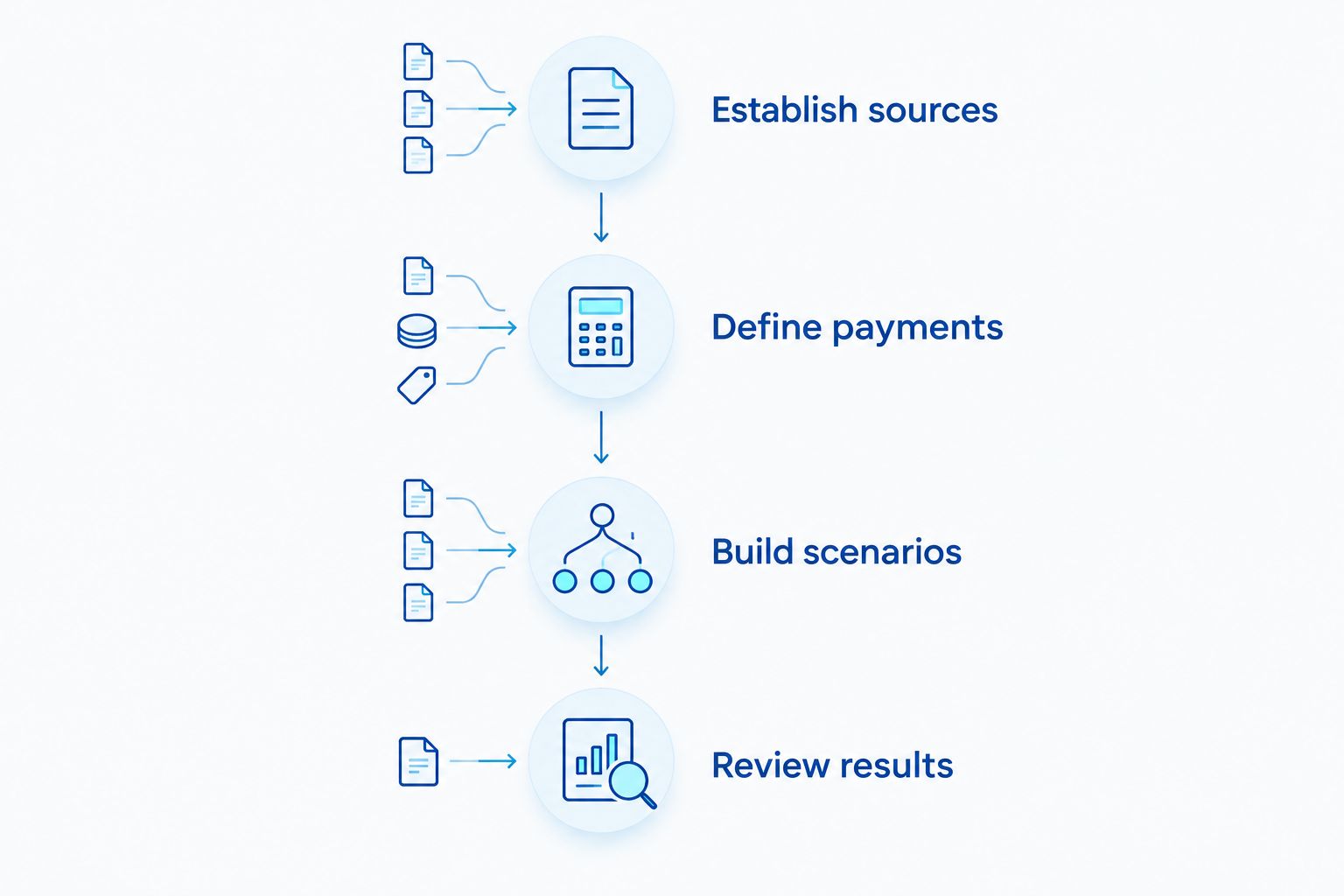
The strongest PILOT calculator is a documented comparison, not a single savings output. Use this sequence to turn the selected spreadsheet into a reviewable project model.
Establish sources
Create an assumptions register before entering payment formulas. Include the document name, relevant provision, date, responsible reviewer, and whether the assumption is proposed or confirmed.
For a 2026 review, verify that the materials apply to the actual parcel, proposed development, and contemplated agreement. A neighboring project's terms are context, not your project's entitlement.
Define payments
List the payment components that apply to the proposed arrangement and obtain qualified confirmation of their treatment. Identify the calculation base, timing, adjustments, and any obligations outside the principal payment.
Keep a revenue definition separate from a revenue projection. The agreement determines what belongs in a defined calculation base; the operating model estimates the amount. Those are different questions with different reviewers.
Build scenarios
Use 3 scenarios: ordinary taxation, the proposed PILOT structure, and a downside case. Keep the physical project and operating assumptions consistent between the ordinary-tax and PILOT cases unless you explicitly explain the difference.
The downside case should test unresolved assumptions rather than silently selecting favorable terms. Examples include a later modeled start date or a different revenue projection. These are analytical choices, not statements about what the municipality will approve.
Review results
For a monthly operating model, reconcile 12 monthly periods to 1 annual total. This check catches timing mismatches between the operating forecast and the payment summary; it does not establish the payment schedule required by an agreement.
Compare annual cash obligations and cumulative results across the same analysis period. If you calculate present value—the value of future cash flows expressed at the analysis date—state the discount rate and explain who selected it.
The output should make unresolved items visible. A model with a clear open-issues list is more useful for a decision than a polished summary that conceals conditional assumptions.
Keep the calculator connected to underwriting
A PILOT comparison belongs inside the development decision, not beside it. Show how each payment case affects operating cash flow and the financial measures your lender or investor actually requires.
Do not assume that a projected reduction in payments produces an equivalent financing benefit. Underwriting depends on the lender's treatment of the arrangement and the rest of the project's financial position. The guide to connecting feasibility studies to lender underwriting explains that handoff.
Nieves Development Consulting LLC provides development strategy, zoning guidance, and municipal-process coordination. Use that coordination role to organize readiness questions and milestones while qualified professionals address agreement interpretation and financial treatment.
Keep approval status visible: A proposed PILOT, a negotiated document, and an executed arrangement are not interchangeable model inputs. Identify the status used in each scenario rather than presenting the preferred case as an established obligation.
How the tools were ranked
Microsoft Excel ranks first for detailed model integration, Google Sheets for shared assumption review, and LibreOffice Calc for an open-source desktop workflow. The ranking follows the criteria above: editable formulas, traceability, comparable scenarios, visible payment components, review, and maintainability.
This is a workflow assessment, not a benchmark of calculation speed or a claim of project testing. The applications perform spreadsheet calculations; the project team remains responsible for the model's structure and source inputs.
Which PILOT calculator should you choose?
Choose Microsoft Excel unless shared browser-based review or an open-source desktop requirement determines the workflow. Use Google Sheets when collaborative assumption management is the priority, and LibreOffice Calc when local open-source modeling is the better fit.
For your 2026 decision, assign ownership before adding complexity. Identify who maintains formulas, who confirms agreement assumptions, and who approves the financial output for its intended use. Software cannot resolve an unassigned review responsibility.
FAQ
What’s the best PILOT tax abatement calculator tool for developers?
Microsoft Excel is the default choice for detailed, project-specific PILOT modeling. Google Sheets fits shared assumption review, while LibreOffice Calc fits an open-source desktop workflow. None supplies confirmed municipal terms automatically.
Is there one PILOT formula that works across New Jersey?
No single generic formula should be treated as applicable to every New Jersey project. Build the calculation from the relevant legal framework and project documents, with qualified review of the payment definitions and obligations.
Is Google Sheets better than Excel for a PILOT model?
Google Sheets is the better fit when shared browser-based review is your main requirement. Excel is the default recommendation when the PILOT schedule must connect to a detailed development underwriting workbook.
Can a calculator confirm that my project qualifies for a PILOT?
No, a calculator cannot establish project eligibility or municipal approval. It calculates the assumptions entered into it; legal and municipal-process questions require separate review.
What should I compare against the proposed PILOT payment?
Compare the proposed arrangement with an ordinary-property-tax case using consistent project assumptions and analysis periods. Include applicable obligations outside the principal modeled payment so the comparison does not omit material cash outflows.
Can I use another development’s PILOT agreement as my template?
Use another agreement only as a reference for questions, not as confirmation of your own terms. Your model needs the documents and assumptions applicable to your parcel, project, and proposed arrangement.
Does development consulting replace legal or tax advice?
No, development consulting and municipal-process coordination do not replace licensed professional services. Obtain appropriate legal, tax, accounting, engineering, architectural, planning, or surveying advice for the questions your project raises.
One last thing
The most useful cell in your 2026 PILOT workbook is the source reference beside the payment assumption. Without it, a reviewer cannot tell whether the result follows an agreement provision, a working proposal, or an unsupported estimate.
Before your next acquisition or financing decision, require that reference for every material payment input. Resolve the unsupported assumptions before treating the preferred scenario as your base case.
Nieves Development Consulting LLC provides development consulting and municipal-process coordination, not licensed legal, engineering, architectural, planning, surveying, tax, or accounting services. This article is general educational information and does not establish eligibility, agreement terms, or an approval outcome.
Related guides
- Connecting a PILOT tax abatement to your redevelopment closing
- How long it takes to close a PILOT tax abatement deal
- Connecting redevelopment projects to NJEDA incentives
YOUR NEXT STEP
Planning a project in New Jersey?
Discuss your property, project goals and municipal-process questions with Nieves Development Consulting.
Explore our consulting services · See a Paterson project example