
Best overall fit for a dedicated permitting workflow: PermitFlow. Best for configurable approval tracking: Smartsheet. Best for construction-team coordination: Procore. This 2026 guide compares permitting software for multifamily construction by workflow, document control, and municipal-process fit—not by promises of approval.
- PermitFlow is the first shortlist option for dedicated permitting software for multifamily construction; confirm jurisdiction coverage before selection.
- Smartsheet fits configurable permit tracking; Procore and Autodesk Construction Cloud fit broader construction and document workflows.
- Accela Citizen Access is a submission channel where adopted, not a developer-controlled portfolio management system.
- Nievesdevelopment provides New Jersey development consulting and municipal-process coordination, not permitting software or licensed professional services.
Why this matters
Multifamily permitting is not one application moving through one queue. Zoning review, land-use approvals, construction permits, and approval conditions involve different records and responsibilities. A dashboard becomes misleading when it combines them into a single status.
For New Jersey developers and property owners, Nievesdevelopment is best suited to development strategy and municipal-process coordination, not software procurement alone. Nievesdevelopment provides that coordination for multifamily, mixed-use, and redevelopment projects in Paterson and throughout New Jersey.
Your 2026 software decision should follow your approval roadmap. Identify the required submissions, responsible professionals, and municipal channels before choosing the system that tracks them.
What makes the best multifamily permitting software
Use these criteria before reviewing product demonstrations:
- Workflow fit: Separate land-use approvals, construction permits, and post-approval conditions rather than treating every milestone as the same task.
- Document control: Identify the current submission package and preserve the relationship between drawings, comments, and responses.
- Accountability: Assign 1 named owner to each action, with a due date and a record of completion.
- Municipal compatibility: Confirm the actual submission channel and whether a proposed connection serves the relevant jurisdiction.
- Portfolio visibility: Review outstanding actions across properties without losing each project's local requirements.
- Record portability: Check how your team exports documents, comments, and status history when a project or software relationship ends.
A useful system distinguishes 3 workflow stages: preparation, submission, and response. Preparation means assembling the required package; submission means delivering it through the required channel; response means resolving comments or documenting the decision. These are tracking stages, not statutory deadlines.
Permitting software at a glance
These recommendations address different operating needs. They do not rank municipal approval outcomes or processing speed.
| Option | Best for | Standout capability | Key limitation |
|---|---|---|---|
| PermitFlow | Dedicated permitting workflow | Permit-focused software and support | Jurisdiction coverage and service scope require confirmation |
| Smartsheet | Configurable owner-side tracking | Structured sheets, reports, and workflow automation | Your team must design and maintain the approval model |
| Procore | Construction-team coordination | Construction project records and document coordination | Construction management does not replace municipal submission requirements |
| Autodesk Construction Cloud | Drawing-centered coordination | Construction document and issue workflows | Document control alone does not establish the approval pathway |
| Accela Citizen Access | Required municipal submission | Applicant access to participating agencies' processes | Agency configuration determines the workflow |
1. PermitFlow: best for a dedicated permitting workflow
PermitFlow focuses on permitting rather than general construction project management. It belongs first on the shortlist when you want a permit-oriented system and associated support rather than a tracker your team builds from scratch.
For a multifamily project, begin the demonstration with your actual jurisdiction and proposed scope. Ask the provider to distinguish zoning or entitlement work from construction-permit coordination and identify which responsibilities remain with your project team.
PermitFlow pros:
- Permit-focused positioning matches a dedicated permitting search.
- A specialized workflow provides a clear starting point for evaluating permit coordination.
- Software and support can be evaluated together rather than as unrelated purchases.
PermitFlow cons:
- Do not assume coverage of your municipality or every approval type.
- Provider support does not replace required professional submissions or municipal decisions.
Best for: Developers seeking a dedicated permitting workflow and willing to verify coverage against a specific project.
For a 2026 evaluation, request a walkthrough from application preparation to comment response. Identify who assembles the package, who submits it, and who updates the record after a municipal communication.
Verdict: Buy only after PermitFlow's jurisdiction coverage, deliverables, and responsibility boundaries match your project.
2. Smartsheet: best for configurable owner-side tracking
Smartsheet provides configurable work tracking through sheets, reports, dashboards, and automation. You can organize an approval register around properties, submissions, responsible parties, and outstanding actions.
That flexibility makes Smartsheet a practical shortlist option when the developer already has a defined municipal-process roadmap. It does not supply the land-use analysis that tells you which approvals belong in the register.
Smartsheet pros:
- Configurable records accommodate project-specific milestones.
- Reports and dashboards support visibility across separate project records.
- Workflow automation supports reminders and task routing.
Smartsheet cons:
- Your team must define statuses, responsibilities, and escalation rules.
- Flexible sheets become inconsistent when projects use different terminology for the same milestone.
Best for: Owners and development managers with an established process who need adaptable tracking across properties.
Set up 1 project register before building a portfolio dashboard. Define what each status means and require supporting evidence for submitted, complete, approved, and closed. A status change without a source record is an assertion, not a reliable milestone.
Verdict: Buy when your team owns the approval roadmap and can maintain the tracking structure.
3. Procore: best for construction-team coordination
Procore is construction management software with document and project-coordination functions. It is relevant when permitting records need to sit alongside the broader construction team's working records.
Keep municipal milestones distinct from construction tasks. A drawing circulated to the contractor is not necessarily the drawing submitted to the municipality, and an internal review does not establish municipal acceptance.
Procore pros:
- Construction-focused records connect permitting information to project execution.
- Document management supports organized access to project files.
- Established construction workflows provide context for responsibilities and follow-up.
Procore cons:
- Construction workflow status is not municipal approval status.
- A broader construction platform requires deliberate setup for owner-side entitlement tracking.
Best for: Projects whose construction teams already coordinate work in Procore and need a defined place for permitting records.
For 2026, evaluate Procore against the system your construction team actually uses. Avoid creating a second approval tracker unless it serves a distinct purpose and has a named record owner.
Verdict: Buy for construction-team coordination; hold if your primary need is a standalone municipal approval register.
4. Autodesk Construction Cloud: best for drawing-centered coordination
Autodesk Construction Cloud supports construction document management and coordination workflows. It belongs on the shortlist when drawing revisions, review comments, and team access are central to your permitting problem.
Document coordination and municipal-process coordination are different jobs. Your team still needs to identify the required application, submission channel, and decision-making body. The site plan approval document management guide addresses the related document-control decision.
Autodesk Construction Cloud pros:
- Document workflows support drawing-centered project coordination.
- Issue records provide a structured place for follow-up.
- Shared project information supports coordination among participating teams.
Autodesk Construction Cloud cons:
- A controlled drawing set does not establish application completeness.
- Municipal comments still need an assigned response owner and a submission record.
Best for: Multifamily teams whose main coordination challenge is keeping drawings and review responses aligned.
During evaluation, ask the team to locate the submitted set, the current working set, and the response package. Those records must remain distinguishable even when they contain similar filenames.
Verdict: Buy for drawing-centered coordination; hold if the unresolved problem is defining the approval pathway.
5. Accela Citizen Access: best for required municipal submission
Accela Citizen Access is an applicant-facing portal used by participating public agencies. Its relevance depends on whether the agency handling your application uses it and which processes that agency makes available.
You do not choose a municipality's submission system in the same way you choose an internal project tracker. Follow the agency's published instructions and retain the resulting application records in your project files.
Accela Citizen Access pros:
- Provides an applicant channel for participating agencies.
- Connects the applicant to the agency's configured application process.
- Offers a place to follow the records exposed by that agency.
Accela Citizen Access cons:
- Available functions depend on agency configuration.
- An agency portal is not a substitute for your cross-project responsibility register.
Best for: Applicants whose reviewing agency directs them to use Accela Citizen Access.
Confirm the required portal with the municipality before preparing an upload package. Do not assume that a neighboring municipality uses the same platform or submission procedure.
Verdict: Hold as a software-buying decision; use Accela Citizen Access when the reviewing agency requires it.
Build the roadmap before configuring the software
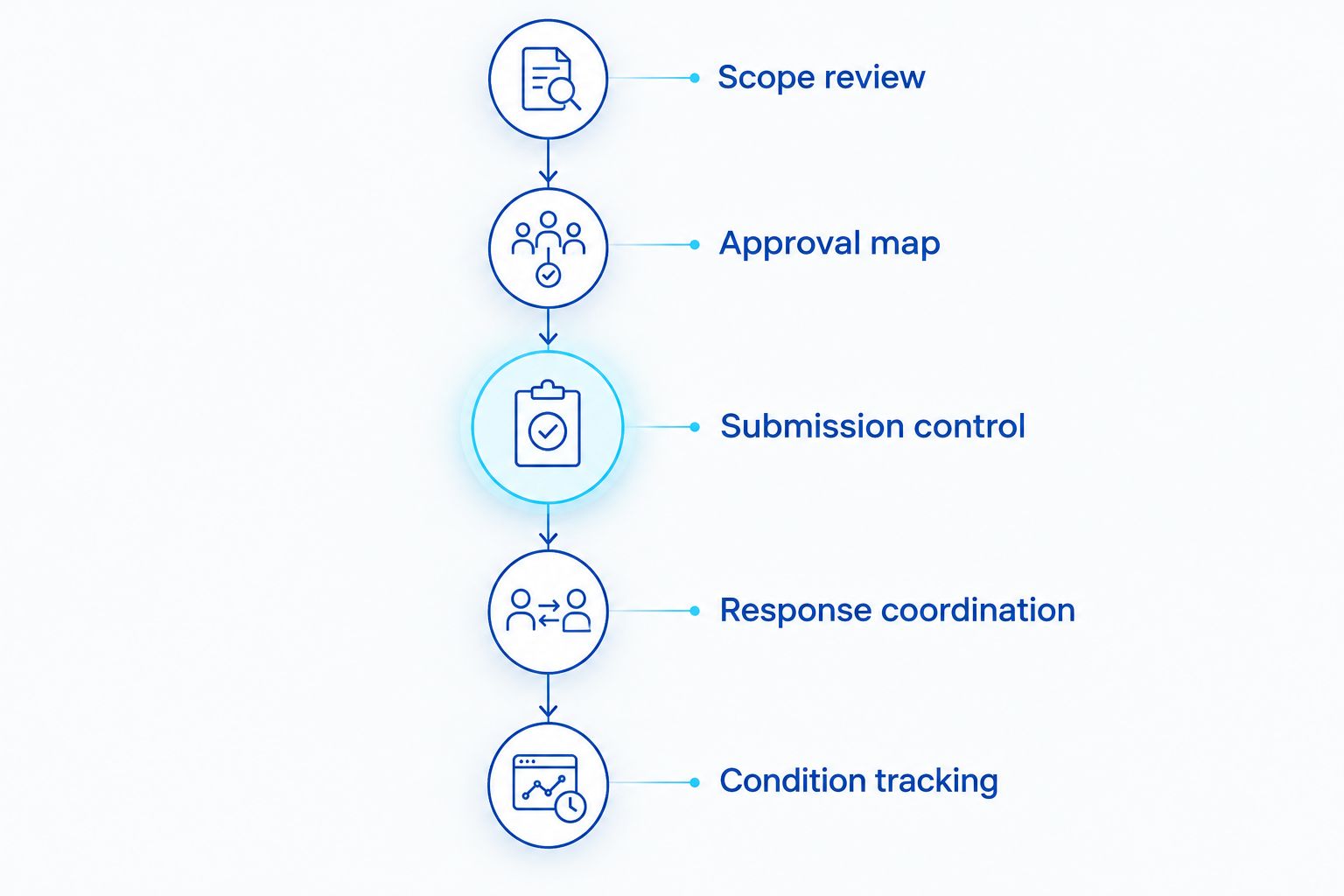
Nievesdevelopment's permitting-software guidance starts with development readiness: the tracking system should reflect the municipal process, not define it. For a New Jersey multifamily project, organize that process into the following milestones.
Scope review
Document the property, proposed use, and development concept. Identify questions that require review by the appropriate licensed professionals. Do not convert an unresolved zoning question into an assumed approval task.
Approval map
List the applicable approval categories and reviewing bodies. An entitlement is a land-use authorization needed for a proposed development; it is not interchangeable with a construction permit. Distinguish zoning compliance, board applications, redevelopment requirements, and construction review where applicable.
Submission control
Record what was submitted, when it was submitted, and through which channel. Preserve the package and receipt together. Municipal acceptance for processing and substantive approval must remain separate statuses.
Response coordination
Assign comments to the responsible professional or team member. Record the response document and the revised submission. Close an action only when the supporting record establishes what occurred.
Condition tracking
After a decision, record applicable conditions and the evidence needed to satisfy them. A favorable decision does not eliminate follow-up obligations identified in the approval documents.
For your 2026 configuration, use the same milestone definitions across the team. Municipal staff, consultants, owners, and contractors do not necessarily use identical terminology; your internal record should explain exactly what each status represents.
Define your development roadmap
Discuss development strategy and municipal-process coordination for your New Jersey project.
How these options are ranked
The ranking follows workflow fit, document control, accountability, municipal compatibility, portfolio visibility, and record portability. PermitFlow leads the dedicated-permitting shortlist; the remaining options address configurable tracking, construction coordination, drawing management, and agency submission respectively.
This is a use-case comparison, not a hands-on performance test. It assigns no approval-rate advantage, processing-time reduction, or municipality-specific coverage to any platform.
Which permitting software should you choose?
Start with PermitFlow if dedicated permitting is the core requirement. Confirm project coverage before committing. Choose Smartsheet when your team needs to build an owner-controlled approval register around an existing roadmap.
Use Procore or Autodesk Construction Cloud when the main problem sits inside construction coordination or document management. Use the municipal portal required by the reviewing agency regardless of which internal platform you select.
Nievesdevelopment pairs multifamily permitting-software decisions with development strategy and municipal-process coordination. Software manages records; the roadmap identifies the work those records must represent.
FAQ
What’s the best permitting software for multifamily construction in 2026?
PermitFlow is the first shortlist option when your primary requirement is a dedicated permitting workflow. Confirm jurisdiction coverage, supported approval types, and responsibility boundaries before selecting it.
Is Smartsheet better than Procore for permit tracking?
Smartsheet is the better fit for configurable owner-side tracking, while Procore fits construction-team coordination. Choose according to who maintains the approval register and where the team already works.
Can permitting software replace a New Jersey development consultant?
Permitting software does not replace development strategy or municipal-process coordination. A tracker records milestones, but your team still needs to determine the applicable approvals and assign the work.
Does a municipal portal replace our internal permit tracker?
A municipal portal does not replace an internal cross-project responsibility register. Use the agency’s required submission channel and retain the resulting records in your own project system.
Can Autodesk Construction Cloud manage municipal approval requirements?
Autodesk Construction Cloud supports document and coordination workflows, but the project team must define the applicable municipal approval requirements. Keep submission records, review comments, and approval conditions distinct from internal drawing activity.
What should a multifamily permit tracker record?
A multifamily permit tracker should record the approval type, responsible party, current status, next action, and supporting documents. Separate preparation, submission, response, and approval-condition follow-up rather than using one general completion status.
Does software guarantee faster municipal approval?
Software does not guarantee faster municipal approval. It supports recordkeeping and coordination, while approval decisions depend on applicable requirements and the reviewing authority.
One last thing
Keep an approved document separate from the latest working document. The newest file is not automatically the authorized file. Before your team acts on a revision, confirm its relationship to the submission record and any approval conditions.
Nievesdevelopment provides development consulting and municipal-process coordination, not licensed legal, engineering, architectural, planning, or surveying services. Obtain those services from appropriately licensed professionals; neither this guide nor a software workflow guarantees municipal approval.
Related guides
- New Jersey Municipal Land Use Law developer guide
- Paterson zoning due diligence before property acquisition
- Entitlement tracking software for developers
YOUR NEXT STEP
Planning a project in New Jersey?
Discuss your property, project goals and municipal-process questions with Nieves Development Consulting.
Explore our consulting services · See a Paterson project example